Showing posts with label Technology. Show all posts

Thursday, May 22, 2025

Future Proofing with Wikitree

In a post on this day last month I said"

"WikiTree I am committed to Wikitree as a collaborative tree. I am working to ensure that my ancestors' and forebears' stories are not lost so I aim to give them all a profile on this platform. It's a future-proofing exercise."

Although they have promised to maintain my website after I am gone my descendants may not have time for this task. My ancestors will also have a home on Wikitree. 

I've spent many hours in this last month ensuring that my direct ancestors and those of my husband have a place on Wikitree. There's a lot more work to be done on these but at least they have a place.

100% complete for five generations on Wikitree

I am now working on their siblings and descendants (my cousins). Where possible I am also linking the ancestors of our living DNA matches into our lines. I rely on my database in RootsMagic on my home computer for my master list from which I currently work.

I found a recent webinar delivered for the Society of Australian Genealogists by Veronica Williams most helpful. Veronica was a guest speaker last Saturday at The Lake Macquarie Family History Group, I learnt a few more Wikitree tips from that excellent presentation.

On April 22 I had 3317 CC7 Connections on Wikitree, on May 20 I had 3765. This is pretty good as during that time I had to unlink a branch to remove connections that had been made in error. This will grow slowly as I spend more time on enriching the current profiles on my lines. 

Monday, April 22, 2024

A Wish CameTrue

Back in 2012 I penned a post about Paper Overload in which I lamented about the practice of many speakers to provide handouts, reference lists in hard copy. I said" My plea to presenters is to offer an alternative to hard copy handouts. PLEASE."

When I happened across that post this morning I thought about current practice and realise that many speakers provide links to soft copies of their handouts to attendees or event organisers. 

The cynic in me thinks that this turnaround is due to Covid when we turned to digital delivery of  genealogy education. It was impossible to provide physical copies of handouts when we were operating in an online world. 

I hope the reason is because more genies have embraced technology over the past twelve years and are realising the benefits to the community of saving paper. 

The image I used in 2012. Source:  kathrynbutler.blogspot.com

Thursday, December 7, 2023

A Snow White Dome

When fiddling on my blog today I noticed that, in my header image, I had brown or pepper and salt coloured hair. Nowadays my dome is snow white.  My branding should reflect the person that I am. 

I liked my old image that showed me waving while frolicking in the ocean. I liken my genealogy environment to a body of water where I can swim - a place where I can relax and have fun, play in the shallows or dive deep, it's somewhere that can throw up challenges and surprises. 

When holidaying in Vanuatu earlier this year I was enjoying a swim in a glorious lagoon when Mr Geniaus snapped a photo of me enthusiastically waving and showing my white hair plastered to my head. The image shows me in a happy place as I am when playing in my genealogy world. 

Over I went to Canva where I created a new header using their Blogger Header template. I've uploaded the completed image to the blog. While I may tweak it over the coming days it will remain basically the same until I next fiddle with my branding.  Next task is creating a new header for the Geniaus Facebook Page https://www.facebook.com/geniauspage

The new header - created with Canva

Monday, November 7, 2022

Tooting

Since Twitter's recent purchase by Elon Musk I am wondering what lies ahead for that platform. Many people in the Twitterverse are predicting dark days ahead for this platform. I hope these predictions are baseless and I can keep tweeting.

I'm a believer in INSURANCE (car, health, house, travel etc.). It didn't take me too long to arrange some insurance in case I find that changes that will come to Twitter under its new ownership unpalatable.  

Yesterday Daniel Loftus in Ireland was recommending  Mastodon as a viable Twitter alternative in his Twitter feed. As I know Daniel is a cluey chap who is on top of tech issues I joined up to one of the Mastodon servers. I discovered that several of my genimates had already joined the #TwitterExodus or put a contingency plan in place by setting up an  account on Mastodon

My Profile needs some more editing

It didn't take long for me to join up and get the hang of this new-to-me platform, I've still a lot to learn but I think I'm going to like it. I have been working on my laptop with the desktop app but last night I also installed the Android app on my phone. 

By this morning I had built up a small list of interesting folk to follow. Once I found some people that I knew on Mastodon I checked their lists of followers/following to add people to my list - easy. 

If you join up to any Mastodon server you can follow me via this link : @JillBallAu@toot.community

If you are on Twitter and need an Insurance Policy how about Tooting with me?

Saturday, August 13, 2022

Loud and clear

I didn't join the weekly SAG hangout yesterday afternoon because my headset is on its last legs.

While I'm not a "gamer" earlier this week I made a purchase of a piece of gaming technology from Amazon AU. I was hoping that it would be delivered by 4pm so I could join my genimates at The SAG but it didn't arrive until way after dark. 

This morning I plugged the new device in and fired up a zoom session to give it a test run. If you listen to the zoom recording below you'll see that the new tech works.


FYI My purchase was a Logitech G432 Gaming Headset. It was only $AU85 and came with free delivery. 

When I plugged it in it was immediately detected by my computer, it's reasonably light and comfortable and appears to work. I'm pleased with my purchase.


Monday, February 21, 2022

Interview with the Big Boss at Rootstech

I was blown away when an invitation to interview Jen Allen, Director of Events for Familysearch appeared in my email box last week. I hear that just five Rootstech supporters from around the world were offered such an opportunity.

I was incredibly nervous when I logged onto zoom and chatted with Andrew Parker from Rootstech prior to Jen's arrival. The good news was that I had a good connection from Narrabri in country, New South Wales to Jen in Salt Lake City, Utah. That the technology was cooperating was a good omen.

Immediately she came online Jen made me feel comfortable before Andrew hit the Record button for us. We had what I hope sounded like a conversation rather than a formal interview. Jen with her bright and bubbly personality certainly made my job so easy. She graciously answered all the points I raised and I went away extremely satisfied and more knowledgeable about Rootstech 2022 and future Familysearch events.

Andrew promptly sent me the interview recording via WeTransfer (what a nifty free tool). On reviewing the video I realise that I forgot to formally introduce Jen, oops. I also spent a bit of time looking down at my list of dot points to cover (I don't prepare formal questions). On the whole I am quite pleased with the result and send my sincere thanks to Jen and the folk at Familysearch for the invitation. 

If you'd like to see what we had to say you can watch the video below.


Wednesday, January 26, 2022

Airtable and GDAT

 Genimate Sharon left this comment on a recent post of mine.

Jill

Do you prefer Airtable to the Genealogical DNA Analysis Tool for managing your DNA kits? Or do they have different purposes? What are your other uses for Airtable?

I realised that it would probably be better to respond here in a post where I can share images than to write a lengthy comment on my earlier post

Firstly I need to point out that although I have been using DNA as a genealogy research tool for around 9 years I still class myself as a basic user. I am not particularly interested in the science behind my DNA matches, my focus is on making connections.

My uses of Airtable and GDAT are for different purposes.

I use Airtable to maintain records of the DNA matches for all the kits I manage and GDAT for chromosome analysis of matches. It's taking me a while to get my head around GDAT, I am currently using it just for my matches and (if I ever get competent) will use it for the other kits I manage.

I had previously used spreadsheets to keep track of all my matches but, after seeing two demonstrations of Airtable at Rootstech 2021: https://www.familysearch.org/rootstech/rtc2021/session/how-to-use-airtable-for-a-dna-research-log and https://www.familysearch.org/rootstech/rtc2021/session/airtable-organizing-your-research-with-a-relational-database, I went exploring. 

I realised that I could link various sheets together and this would mean that I could remove some data from my Excel spreadsheets (tables on Airtable) to secondary sheets (tables) linked back to primary sheet (table). On Airtable one can have Workspaces that store Bases which can contain multiple Tables.

The following image shows what my homepage looks like on Airtable. One can have multiple Workspaces - I just have one.
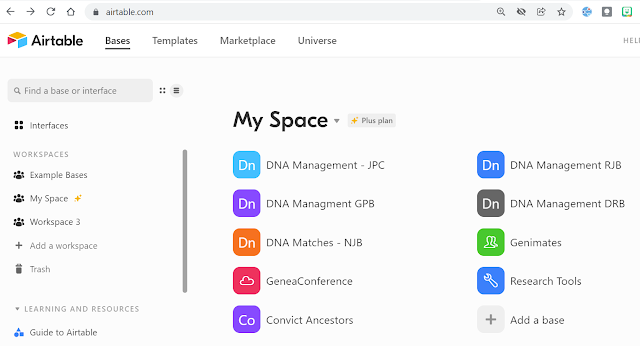
The Bases in my Airtable Workspace

In my DNA Management - JPC Base I track matches for the seven kits I manage that share my ancestors. Within this base I have four tables that are related to the primary table.


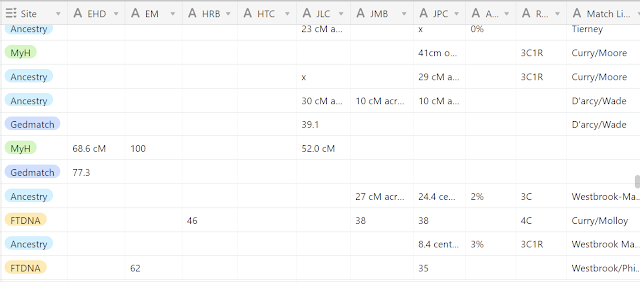
The Fields I have on JPC Matches are: Kit Name, Surname, Forename, Kit Manager, Line (4 grandparents), DNA Painted, GDAT, Test Site, Columns for each match, % of Aboriginalty, Relationship to me, Match line. this next image shows part of the setup.


Further fields to the right of this image are match location, notes, and a link to the Match Details table.

You will note plenty of empty spaces as each cell is not pertinent to each tester. This is a work in progress where I add every match I find for those seven people. Each test one person does has a separate record.

I love that I can set up Multiple Select Fields for easy data entry which I use for Line, Testing Company, DNA Painted and GDAT.
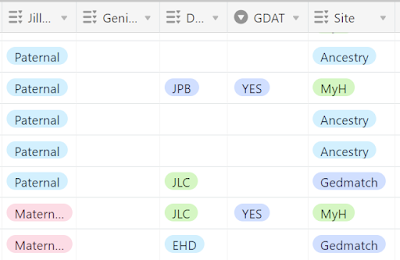
Multiple select fields save typing

The possibilities for use of this program are endless. setup is easy, data entry uncomplicated and there are so many means of sorting, sifting and analysing data. There are many templates available in the Airtable community that one can use and modify to a situation.

Another way I use Airtable is to keep track of my genimates. Over the years I have met so many folk in person and online. It's good to be able to quickly find their details when my poor old memory fails. 

My Genimates base has these tables.


Genimates has details of the people I have met, Terms manages my Geneadictionary entries (which links back to Genimates), Blogs has details of various blogs (links to Genimates and Societies), Websites has details of various websites (links to Genimates and Societies), Societies/Hosts (links to Blogs, Websites and Presentations) and Presentations manages my gigs and links back to Societies/Hosts.

After playing around with Airtable for a couple of months I took out a subscription because some of my bases grew to be too large (more than 1200 records) to be covered by a free account. I also wanted the flexibility to create more bases than allowed in a free account. I have read of other genies (watch the two videos from Rootstech) who use a free Airtable account successfully for their projects.

I plan on using GDAT for chromosome analysis. The GDAT website says "Genealogical DNA Analysis Tool (GDAT) is an app that utilizes autosomal DNA to aid in the research of family trees. The app houses a database of the autosomal data downloaded from various testing companies and provides analysis tools for family history research." 

While it's a challenge for this old girl I understand that GDAT is the gold standard for chromosome analysis. I have managed to download my matches from several other sites to GDAT and am slowly getting to know the product. I would love to have someone to hold my hand on this journey. 

Thursday, December 30, 2021

A clearer view

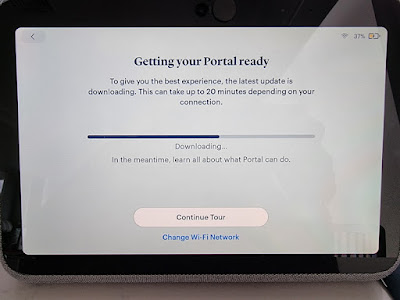
Among the surprises I received at Christmas was a new tech toy that promises to enhance my participation in online events. I have set up and had a couple of test runs with my Facebook Portal Go.  

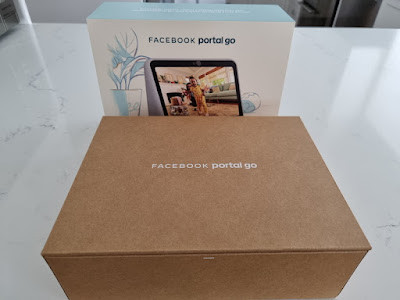
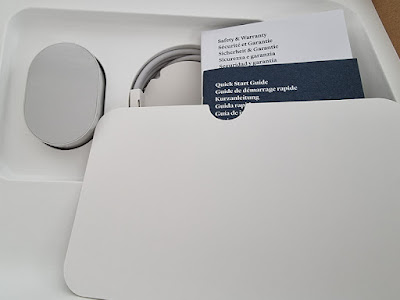
What's in the Box?

The device, a charger, power cord and minimal instructions came in the box

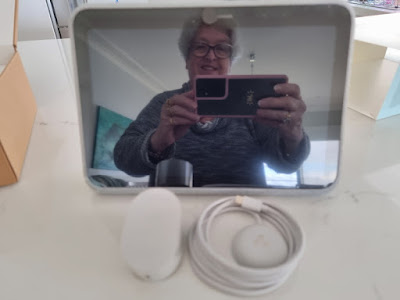
The device which is heavy for its size is covered in fabric and has a carrying handle built into the back

It was easy to set up and the battery didn't take too long to charge

My Facebook Portal Go appears to have all the features of my the Google Nest mini I won at Rootstech a few years ago and so much more. I need to spend some time getting to know it. As it doesn't have a keyboard I won't be using it to write and publish blog posts but I can use the keyboard on its touchscreen for simple internet browsing.

I will mostly use the Portal, which connects via my home wifi to to the world, for Zoom and Facebook live sessions but one can also use it on other similar platforms. The inbuilt video camera which is angled to give a positive view of one's face is far superior to my external webcam and that in my laptop. It sent a very clear image to those I connected with. Those connections tell me that the inbuilt microphone picked up my voice well and that I came through clearly.

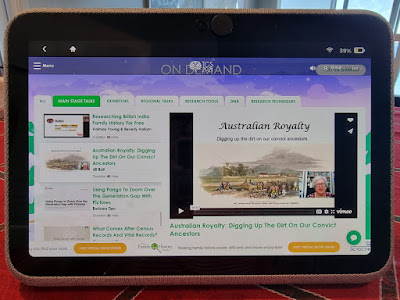
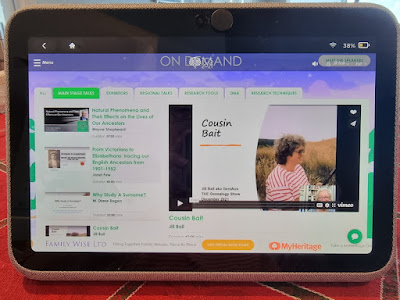
Testing out the browser I found it was quite easy to connect and view some sessions from The Genealogy Show on the device. 


Saturday, December 4, 2021

A New Toy for GeniAus

I ummed and aahed when the Black Friday sales offers appeared in my social media feeds. 

Did I need a new phone? No. Would it be nice to have a new phone? Yes.

My Samsung Galaxy Note 7 has given excellent service for four and a half years without missing a beat but the option of a phone with more storage and superior cameras was tempting. How much longer would the Note 7 last?

Mr GeniAus didn't seem too perturbed about my investment in a new gadget so just prior to the offer for a Samsung S21 Ultra 5G 256GB closing on 29 November I placed an order.  Realising that the one to two week delay quoted by the seller would probably be around Christmas I thought it would be a nice gift for myself.

Lo and behold a parcel containing my new toy was delivered on Wednesday this week, just two days after placing my order. 

Using the Samsung app Smartswitch made the transfer of all my apps, documents and photos from my old phone a breeze. 

I had an issue with a few older apps for which I couldn't remember my login details or which defunct email address I had used to register with them. I had a panic when my photos didn't appear to be in the Gallery on the new phone but, on investigation, found they were in an archived folder - phew!

The main difference I have noticed with the new phone is the quality of the images I snap - they are so clear, a bonus when recording family events. 

Sunday, September 26, 2021

From the Archives - Into the 21st Century with SAG

In the ten years since I penned the post below I have hosted and presented several webinars in the Society of Australian Genealogists Education Program. 

From one session a month in 2011 the Society now hosts several sessions each week, some are presented on the GotoWebinar platform while many are now presented on Zoom which allows for easier interactive participation by attendees. 

For five years I have been a proud member of the SAG Education Committee which assists and advises the staff of the Society with program delivery and development. We regularly host international expert presenters from overseas which provide our members access to learn from geneastars without having to grab a passport and hop on a plane.  Recently the SAG opened up attendance at these sessions to non-members so genies anywhere in Australia and overseas can learn from home. 

Since the Covid19 pandemic hit in March 2020 all SAG events have been delivered online giving members in regional and remote areas opportunities to receive high quality education.  The popular Members' Hangouts during the pandemic have given members an opportunity to socialise and chat while absorbing online tips and shared stories from fellow researchers. I know more SAG members now than I ever did during my many years of membership.

You can access the SAG Education Program here on their website, https://www.sag.org.au/events.

Following is my report of the very first hangout in 2011. Thanks to Heather Garney and Martyn Killion for their vision in launching this impressive program.

Saturday, September 24, 2011

Into the 21st Century with SAG

Thursday night, with Captain Heather Garnsey at the helm, I joined around 60 other members  of  SAG (The Society of Australian Genealogists) in SAG's first paid webinar for members. It is so good to see this organisation employing technology to reach out to members.

Thanks Heather for permission to post this image
Genealogists from a number of Australian States and rural and metropolitan areas in NSW joined Heather for the event. Instead of an hour's trip by car to get to SAG in the city I only had to spend a few minutes firing up the computer to get my fix of CGD. For members who live in rural areas getting to SAG for educational events is extremely difficult. Hopefully this initiative will snag a few new members for SAG.

I salute Heather on her competent management of the GoToWebinar software that is used for delivery. She did a great job drivng it while presenting her talk. As SAG are charging $10 for the webinar and, as they should be getting the software for a song (hope Aussie organisations get the great deals available to non-profit organisations in the US), perhaps they could afford to have another person online to support the presenter.

NSW Shipping Records Online was the topic for Heather's talk. Although introductory in nature I learnt a few new tricks from the talk that concentrated on online records at Ancestry.com.au and State Records of NSW.   Added to my todo list is to take a look at these records for the ancestors whose immigration details I found years ago - I should be able to find more details to flesh their profiles. After her formal presentation Heather responded to attendees questions.

Webinars are a wonderful way to present educational and information sessions via the web. I attend on average one per week, this week I have tuned into three. A list of webinars available to genealogists can be found at the Geneawebinars calendar. The SAG webinars are not listed on this site

Future SAG Webinars
It appears that SAG has at least one webinar a month scheduled for the future. Anyone is able to visit the SAG site to find details of these forthcoming educational offerings (scroll to bottom of page) but you will have to become a member to join in.

Wednesday, September 8, 2021

Housework time at Geniaus.net

I remember somewhere, sometime saying that I intended to update my website GeniAus Family Site every month or so. It seems that my good intentions flew out the window. I just checked to see when I had last updated the site and it was back in February.

GeniAus Family Site

Ever since we went into our latest Covid lockdown a website update has been on my gunna list but I keep saying I'll do it tomorrow. During the lockdown I have been hatching, matching, and dispatching many ancestors.  I hadn't looked at some of my research from last century since last century and, in that period, many new records have come online and several elderly cousins have left this mortal earth. 

When I did my early research I was grateful to find one source for each event but I have learnt that is not enough. Events need to be corroborated by multiple sources of quality. Lockdown has given me time to go back, update records and seek new sources.

Each day I think I'll update the website now but then I say "I'll just check a few more records and upload tomorrow."  I could have gone on like this until Christmas. When I wanted to share a link to the record of a family member who had recently passed away I realised that I needed to upload a gedcom containing the death date of that person to make the record appear on the GeniAus Family website.  (Records of living people are not in the public domain on my site.) All of a sudden I had a pressing need for an immediate upload.

So today, 7 months since my last update, I have spent a few minutes exporting a gedcom from my Family Historian software and uploading it to my website ( TNG software hosted by Simply Hosting). If I had remembered where I had saved my login details for the site this should only take around five minutes! Sadly it took me much longer to retrieve those details. Once I was at the host's site I also made a full backup of my website that I will store on an external hard drive. 

A few statistics from the GeniAus Family site today.

I am constantly making edits and additions to my Family Historian database so I will try to remember a monthly website upload (reminder now in calendar). I wonder if I will manage.

Sunday, August 8, 2021

Genealife in Lockdown - Empty Pages.

Genimate Alex Daw over at the Family Tree Frog blog has challenged fellow geneabloggers to write about their lockdown experiences in a series of blog posts on Sundays during National Family History Month in Australia.

See what Alex has to say about the challenge here: 

As someone who is always up for a challenge I will try to post on the topic Genealife on Lockdown each Sunday in August. Following is my second post of five.

Wednesday, June 9, 2021

An early morning zoom with Ancestry

From time to time the bods at Ancestry.com invite groups of genealogists along to online briefing sessions. As someone who doesn't like getting up at dawn I miss most of these events. 

Today's event was repeated - one session was at 2am my time and the other 7:30am. I signed up for the 7:30am session in case I was conscious by then. Fortunately I was awake before 7am so I grabbed my laptop and earbuds from my study and crawled back under the covers.

Rearranged genealogy apps and widget
On logging in I saw several familiar faces from Australia, New Zealand and the US. The session was hosted by Crista Cowan accompanied by a team of Ancestry tech guys. I was pleased that I attended because the session focused on the Ancestry mobile apps which I had installed as soon as they were released.

Pre-Covid I often used the Ancestry App and the AncestryDNA app on my Android phone but, while
homebound over the past 18 months, I have only used the desktop application to communicate, collaborate and research with Ancestry. I was impressed by the demos of all the new features in these apps. The functionality has improved heaps and many new features have been added, these apps now appear have most of the features of the desktop product. The tech guys online took note of the user comments in the chat and will consider points raised for further development.

I must have been sleeping under a rock because I was unaware of the Ancestry widgets (one available in Australia, one to come). I thought I'd log into my apps and follow along and install the widget while watching the presentation but I had been logged out of the apps and couldn't remember my password. 

My first job after the session ended was to grab my phone, locate my password and log in to my apps. As I wanted to install the Ancestry widget I had to move all the icons around on the screen that has my genealogy apps. With a two-three hour car ride ahead of me tomorrow I have another option to keep me amused.

Ancestry has recognised that many of us live on our mobile devices and has created a fabulous mobile option that will give us access to all our Ancestry data when we are on the move. I'm so pleased I joined in to learn about it this morning. 


Wednesday, July 1, 2020

A Mobile Library

At night time I indulge in an activity that is not family history. I can often be found taking to my bed directly after dinner to indulge in this passion. 

My Mum loved her Books
One of the genes that I inherited from my mother was a love of reading that continues to this day. My commitment to this activity has ebbed and flowed over the years but currently, as I am largely confined to quarters due to the Covid-19 Pandemic, I have more time to devote to the printed word.  

As a child I can remember accompanying Mum to a subscription library in Kings Cross where she borrowed books. When we moved to the Randwick Municipality we used to borrow from their mobile library which stopped at Maroubra Junction on a Saturday morning. That was when I got my first library card and became a regular borrower. As an adult a career working in public and school libraries afforded me easy access to large collections for no outlay.

Since becoming a retired old biddy I haven't made many visits to local libraries except for genealogy related activities. I have purchased many books and dropped so many hints for gifts of books or book vouchers on birthdays and other special occasions. As new books are rather expensive I have been able to pick up many near new books at op shops, charity book fairs and my favourite online charity bookstore, Brotherhood Books. I keep a list of recommended/wanted books and every so often check Brotherhood's catalogue to see if these are listed. 

I love physical books, the smell and feel of the paper adds a pleasurable and familiar element to the reading experience. During Covid time most of the places where I sourced my books dried up - op shops and libraries closed and no book fairs . I had to find some other way of satisfying my appetite for reading.

My Mobile Library
When going on holidays I had been in the habit of downloading a few eBooks from local libraries in case I read through the half dozen "read and ditch" books I usually pack. So Covid-19 made me turn to eBooks. After a few months of reading the books I had borrowed on my smartphone I decided that I needed some sort of eReader. I did a bit of research and decided to purchase a lightwieght inexpensive, Android tablet which would give me more flexibility than a Kindle or similar device.  Then I struck a problem as the Samsung tablet I wanted to purchase was out of stock in Australia. 

Finally around a month ago I found that some local retailers had the desired tablets in stock. I phoned the closest store, got them to match the lower price of another shop and quickly dispatched Mr GeniAus on a mercy mission to buy one. I am enjoying reading on the new device, it's not too heavy to hold up in bed, I can more easily see the text I am reading and I don't have to turn the pages so often. 

My tablet is set up with apps from several local libraries and vendors of eBooks like Amazon and Google. I have also copied all of the other eBooks I had on my hard drive to the device. I have installed just a few other apps: a browser, email and Facebook. My 21st century version of the mobile library is truly mobile and has access to more titles than were available on those Saturday mornings at Maroubra Junction.

The initial purpose of this post was to share my pride in having read 63 books in the first half of 2020 but I digressed. You can see what I have read this year here on the fabulous, free site Librarything https://www.librarything.com/catalog/GeniAus.&deepsearch=read+2020.


Sunday, April 19, 2020

Dear Jill ... Best Wishes Bill

I often get follow up questions from people who attend my webinars.

This week I heard from Bill who came along to the session I presented for The Society of Australian Genealogists on Online or E Books for Genealogy. Rather than answering Bill personally I thought that I would address his queries in a blog post. So here goes.

1. Which is your eReader of choice, for both being pleasant to use and for crossing the platforms?

 I currently use my Samsung Galaxy Note phone to read my eBooks but, as I have ramped up my reading of eBooks recently, I decided to take the plunge and purchase an eReader. 

I want something lightweight, that has a display that combats eye strain and is compatible with the apps I regularly use. I only need wifi access to the internet. My choice was a Kindle Paperwhite 32gig because it is light at about 190 grams, has a reasonable amount of storage, has a kind to the eyes display and is waterproof. However using it to download ebooks with the apps from my local library is a multistep process. These devices can be found online for under $AU200.

2.         For reading colour and larger format publications, which eReader suits?  For one example, the http://www.whodoyouthinkyouaremagazine.com/.

One of the reasons that I haven't committed to an eReader is that they don't yet deal with colour although I have read that this is coming to eReaders in 2020! See https://goodereader.com/blog/e-paper/will-you-buy-a-color-e-reader-next-year.

Although its screen is tiny I read colour magazines on my phone or during the day I read them on my laptop. Neither of these is ideal. I have a large heavy android tablet that I bought when I though Bigger is Better. It is too heavy and cumbersome for comfortable reading. 

I am now leaning towards buying a light 7" wifi only Android tablet that will cost only a few $$ more than an eReader. It won't solve the eyestrain problem but it will give me the flexibility to view in colour and use a range of eBook formats that I have with my Android phone. With a mini SD card inserted I will have enough space to store all my books on the device. My credit card is at the ready I just need to take the plunge!

3.         And on magazines, which do you access online for family history and easily readable?

I have to admit that I am not a great fan of printed mags in digital format. The only ones I browse are those from the local library's RBDigital collection. I still get the SAG journal in a printed format!

4.         Looking at the State Library, it seems their ProReader defaults to Adobe Reader.  OK?

Newcastle Library also provides these resources. I have downloaded the required app to my Android phone and I'm not aware of any issues. Adobe have a guide on their website. 

5.         Woollahra Library seems to have RBdigital for magazines and books, Overdrive, Bolinda, indyreads and EBSCO for books – haven’t researched them all!

I'm a member of three public libraries who each have different options available. I find some of their search functions difficult to operate. I'm currently fulfilling my reading for pleasure needs via the Libby app from Overdrive, I've used EBSCO resources widely over the years and am dabbling with others. 

6.         Seemingly a lot to take in

I hope these rambling are of some use Bill. Good luck with your eReading. 

Friday, October 18, 2019

The Conference Checklist - Rootstech London

When I usually attend a Rootstech event it is a shorter trip from Australia to Salt Lake City followed by a spot of touristing in the USA. This time Rootstech London comes at the beginning of an eight week holiday that takes us to the US, South America and Antarctica so getting ready is a real challenge as I need clothes and gear for so many climates. I also need space for my two day shopping spree in Miami.

I had my hair cut very short but will it last the distance? Now I need to look at the checklist I did for the last geneaconference, THE Genealogy Show 2019, that I attended in England  and modify it. 

If you are looking for me at Rootstech just seek out the little old lady with the distinctive bag.


The GeniAus bag


Here is my list. Highlighted is what else I must still do
  • Airport transfer - Booked. After a 23+ hour flight we want our transfer to the hotel to be stress free. 
  • Books - A couple of unread books that I can swap on our cruise ship once read. Have also download a few eBooks from the local library onto my phone.
  • Purchase and pack breakfast bars, liquid breakfasts and healthy snacks for quick meals.
  • Pack Clothes - always a challenge
  • Deliver Paddy to his second home where he loves playing with his mate Freddo.
  • Empty the Frig and Pantry - In Progress - they already resemble Mother Hubbard's Cupboard.
  • Flights - Booked, Seats are allocated so no need to book in online.
  • Foreign Currency - Task delegated to Mr GeniAus. Have GBP and USD.
  • Hotel Accommodation - All booked.
  • Luggage - Two small suitcases are easier than one large one for an old girl to manage, I take one small carryon for the plane basically because I can't pack batteries and laptop in luggage for the hold. I can't understand why so many people carry such large bags on board - they must pack the kitchen sink. I could make do with a large handbag.
  • Maps - will rely on Google maps on my phone and 
  • Mobile Phone and Battery Pack - We have a plan that gives us international roaming and a small data allowance. It is handy to be able to phone Mr GeniAus when I lose him in a cemetery or shopping mall. I had a dinosaur battery pack that is so heavy. Now have a lighter new one that give two charges.
  • A Notebook - I lose loose bits of paper.
  • Oyster Card for travel on London network
  • Passport and ESTA (for the US) - Already in travel handbag with sleeping pills for the plane.
  • Pegs and Laundry Soap -  No need to buy expensive "travel" products. 
  • Pencil Case - a few pens and pencils and a small ruler that has a magnifying window(Handy for reading small print or old handwriting).
Nifty ruler with magnifying window 
  • Phone the Banks and Amex:  Need to let them know we are travelling, helps them monitor for fraud - Done.
  • Pills and potions - All sorted, have packed an emergency 'just in case' kit of favourites. A few days supply in handbag in case we part company with our bags.
  • Rental Car - another job for Mr GeniAus, done months ago. 
  • Compile list of research tasks for The National Archives - In progress in my Family Historian Database.
  • Clean off all my SD cards - have backed up all photos on them to two hard drives.
Storage for my SD Cards
  • Technology: Digital camera and charger, Laptop, Portable 4 TB HDD Drive ( I download and tag my photos religiously most days), Chargers, Universal Adapters. Most of this stuff lives in a purpose designed case that doesn't get unpacked between trips.  Of course my mouse will be travelling with me, I can't get by without my mouse.
  • Scan Travel Docs - Include copies of prescriptions for drugs and glasses, health report from GP, Passport, Credit cards, Driver's Licence. Save onto phone, hard drive, Google Drive and computer. Mr GeniAus carries a hard copy of files as well.
  • Should I take a Selfie Stick? I have a cheap, light one and a quality reliable one that is heavy.
  • Travel insurance - Renewed.
  • Walking stick - needed for cities with cobblestone and uneven paths.
  • Water bottle - Can fill once I have passed through security at airports.
My Travel Tech setup 
Specifically for Rootstech
  • Find out names of Aussies who are travelling to Rootstech London -- have set up a Facebook Group and organised a pre-conference dinner 
  • Blogger Beads - which ones will I wear?
  • Follow fellow Show attendees on Twitter - added a few new genimates to my feed already.
  • Conference Registration - Pass downloaded and printed
  • A light day bag for conference - Packed
  • GeniAus Business Cards 
  • GeniAus Ribbons 
  • A Notebook - I find writing notes helps me to reinforce my learning
  • Rootstech App - Downloaded
  • Schedule - Have put everything into my Google Calendar. Needs to be accessible on my phone.
  • Technology - I take a few extra toys when attending a conference as I may want to blog, vlog or interview genimates includes A dual headed microphone for interviewing with my phone. 


Friday, September 13, 2019

A Local Facebook Page

I chaired my first committee meeting as President of the Lake Macquarie Family History Group this afternoon. I was thrilled that they agreed to my proposal to have a Facebook page for the Group. So you can guess what I have been busy doing this evening. https://www.facebook.com/lmfhg/


Saturday, May 18, 2019

Equipped for THE Genealogy Show 2019?

I try to travel light!
As I prepare for my trip to the UK to attend THE Genealogy Show 2019 I need to think about packing. Prior  to THE Show Mr GeniAus and I are doing a Garden Tour, visiting some UK archives and graves of the ancestors and  catching up with a cousin. I anticipate being exhausted after THE Show so we'll be boarding one of our favourite cruise ships for some R&R.

My cases are open on the floor of a spare room and the bed is littered with clothing, medications and other essentials! 

This is what I must remember:
  • Airport transfer - After a 23 hour flight we want our transfer to the hotel to be stress free.
  • Books - I'll take a couple of unread books that I can swap on our cruise ship once read. Will also download a few eBooks from the local library onto my phone.
  • Purchase breakfast bars, liquid breakfasts and healthy snacks for quick meals - packed.
  • Deliver Paddy to his second home where he loves playing with his mate Freddo.
  • Empty the Frig and Pantry - In Progress - they already resemble Mother Hubbard's Cupboard.
  • Flights - Booked, Seats are allocated so no need to book in online.
  • Foreign Currency - Task delegated to Mr GeniAus. Have GBP and Euros.
  • Hotel Accommodation - All booked.
  • Luggage - Two small suitcases are easier than one large one for an old girl to manage, I take one small carryon for the plane basically because I can't pack batteries and laptop in luggage for the hold. I can't understand why so many people carry such large bags on board - they must pack the kitchen sink. I could make do with a large handbag.
  • Maps - Taking a UK road atlas and Western Europe SatNav (if you are renting a car for more than a week buy your own SatNav - works out cheaper).
  • Mobile Phone and Battery Pack - We have a plan that gives us international roaming and a small data allowance. It is handy to be able to phone Mr GeniAus when I lose him in a cemetery or shopping mall. I had a dinosaur battery pack that is so heavy. Now have a lighter new one that give two charges.
  • A Notebook - I lose loose bits of paper.
  • Passport - Already in travel handbag with sleeping pills for the plane.
  • Pegs and Laundry Soap -  No need to buy expensive "travel" products. 
  • Pencil Case - a few pens and pencils and a small ruler that has a magnifying window(Handy for reading small print or old handwriting).
Nifty ruler with magnifying window 
  • Phone the Banks and Amex:  Need to let them know we are travelling, helps them monitor for fraud - Done.
  • Pills and potions - All sorted, have packed an emergency 'just in case' kit of favourites. A few days supply in handbag in case we part company with our bags.
  • Plastic Plates and Cutlery -  Just two sets.There's nothing like a picnic dinner of bread, cheese,tomatoes and ham.
  • Rental Car - another job for Mr GeniAus, done months ago. 
  • Compile list of research tasks for The National Archives - In progress in my Family Historian Database.
  • Clean off all my SD cards - have backed up all photos on them to two hard drives.
Storage for my SD Cards
  • Technology: Digital camera and charger, Laptop, Portable 4 TB HDD Drive ( I download and tag my photos religiously most days), Chargers, Universal Adapters. Most of this stuff lives in a purpose designed case that doesn't get unpacked between trips.  Of course my mouse will be travelling with me, I can't get by without my mouse.
  • Scan Travel Docs - Include copies of prescriptions for drugs and glasses, health report from GP, Passport, Credit cards, Driver's Licence. Save onto phone, hard drive, Google Drive and computer. Mr GeniAus carries a hard copy of files as well.
  • Should I take a Selfie Stick? I have a cheap, light one and a quality reliable one that is heavy.
  • Travel insurance - Renewed.
  • Walking stick - needed for cities with cobblestone and uneven paths.
  • Water bottle - Can fill once I have passed through security at airports.
My Travel Tech setup 
Specifically for THE Show
  • Follow fellow Show attendees on Twitter - added a few new genimates to my feed already.
  • Find out names of Aussies who are travelling to THE Show -- wonder if I have missed anyone?
  • Conference Registration - Done
  • GeniAus Business Cards - Packed
  • GeniAus Ribbons - Packed
  • Blogger Beads - which ones will I wear?
  • Comfortable, professional looking outfit and shoes for when I'm on stage.
  • A light day bag for conference - Packed
  • A Schedule - Haven't studied the program in depth but need to have a spreadsheet in Google Docs or put everything into my Google Calendar. Needs to be accessible on my phone.
  • Back up my presentations - Still fiddling with the order of my slides.Need to prune a few too.
  • Technology - I take a few extra toys when attending a conference as I may want to blog, vlog or interview genimates. A dual headed microphone for interviewing with my phone, my headset and microphone and a webcam - all packed. 
Any further suggestions?

Thursday, October 11, 2018

A Blog Reader's Plea

I recently read Carmel Galvin's excellent post Untangle those Blogger Knots.  This set me thinking about a pet peeve of mine and a piece of advice  I wish geneabloggers would heed from me.

I travel a lot and try to keep up with blog reading on my smartphone when I have a spare moment. I find it most irritating when I am unable to read a blog post because it is not optimised for mobile devices.

GeniAus - At sea on a smartphone
When some blogs display on a mobile device the font is so small that is is nearly impossible to read. On others the font is in a pale colour that is also hard to read, I am a fan of pale gray but not as a font on a white background. (I am thinking of one blog in particular that uses a Wordpress theme but there are several I follow that are difficult to read).

In this 21st century many folk like me use their smartphones for a lot of their internet browsing. You may be missing out on potential readers if your blog is hard to read on these devices.

Have you taken a look at how your blog displays on a smartphone? Is the font tiny? Does the reader have to do a lot of scrolling from left to right to read each line? Is there plenty of contrast between the font and background colours to make reading easy?

I realise that some bloggers do not have smartphones and are therefore unable to see how their blogs look on these devices. Perhaps you could ask a friend to view your blog on their smartphone. If you don't have a smartphone toting friend feel free to send me your blogs' URLs and I'll take a look for you.

Monday, May 14, 2018

In Good Company at Rootstech

While at Rootstech earlier this year I was interviewed by The Family History Fanatics. They asked me a series of questions about my genealogy practices.

They must have asked similar questions of some of the other genealogists they interviewed. Four of us have been featured in this video posted on Youtube by The Family History Fanatics last week. I was chuffed to be included on the same video as these three prominent genies.


How would you answer the question "What genea-tech can you not live without?

LinkWithin

Related Posts Plugin for WordPress, Blogger...