
Genimate Sharon left this comment on a recent post of mine.
Jill
Do you prefer Airtable to the Genealogical DNA Analysis Tool for managing your DNA kits? Or do they have different purposes? What are your other uses for Airtable?I realised that it would probably be better to respond here in a post where I can share images than to write a lengthy comment on my earlier post
Firstly I need to point out that although I have been using DNA as a genealogy research tool for around 9 years I still class myself as a basic user. I am not particularly interested in the science behind my DNA matches, my focus is on making connections.
I use Airtable to maintain records of the DNA matches for all the kits I manage and GDAT for chromosome analysis of matches. It's taking me a while to get my head around GDAT, I am currently using it just for my matches and (if I ever get competent) will use it for the other kits I manage.
I had previously used spreadsheets to keep track of all my matches but, after seeing two demonstrations of Airtable at Rootstech 2021: https://www.familysearch.org/rootstech/rtc2021/session/how-to-use-airtable-for-a-dna-research-log and https://www.familysearch.org/rootstech/rtc2021/session/airtable-organizing-your-research-with-a-relational-database, I went exploring.
I realised that I could link various sheets together and this would mean that I could remove some data from my Excel spreadsheets (tables on Airtable) to secondary sheets (tables) linked back to primary sheet (table). On Airtable one can have Workspaces that store Bases which can contain multiple Tables.
The following image shows what my homepage looks like on Airtable. One can have multiple Workspaces - I just have one.
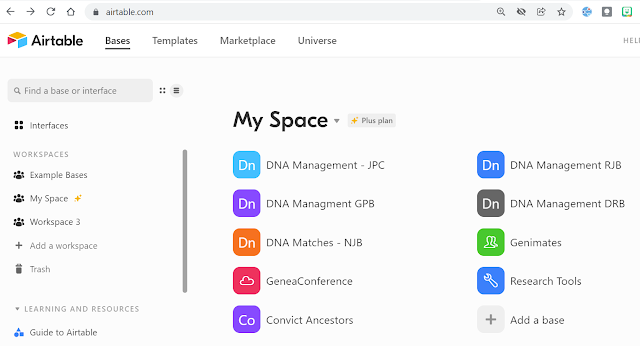 |
| The Bases in my Airtable Workspace |
In my DNA Management - JPC Base I track matches for the seven kits I manage that share my ancestors. Within this base I have four tables that are related to the primary table.

The Fields I have on JPC Matches are: Kit Name, Surname, Forename, Kit Manager, Line (4 grandparents), DNA Painted, GDAT, Test Site, Columns for each match, % of Aboriginalty, Relationship to me, Match line. this next image shows part of the setup.
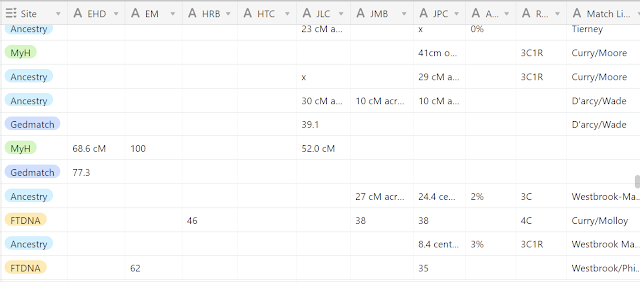
Further fields to the right of this image are match location, notes, and a link to the Match Details table.
You will note plenty of empty spaces as each cell is not pertinent to each tester. This is a work in progress where I add every match I find for those seven people. Each test one person does has a separate record.
I love that I can set up Multiple Select Fields for easy data entry which I use for Line, Testing Company, DNA Painted and GDAT.
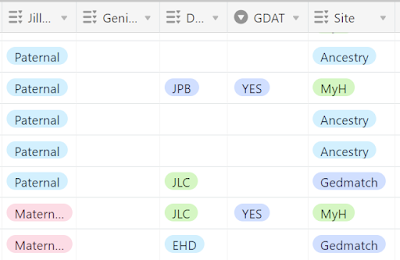 |
| Multiple select fields save typing |
The possibilities for use of this program are endless. setup is easy, data entry uncomplicated and there are so many means of sorting, sifting and analysing data. There are many templates available in the Airtable community that one can use and modify to a situation.
Another way I use Airtable is to keep track of my genimates. Over the years I have met so many folk in person and online. It's good to be able to quickly find their details when my poor old memory fails.
My Genimates base has these tables.

Genimates has details of the people I have met, Terms manages my Geneadictionary entries (which links back to Genimates), Blogs has details of various blogs (links to Genimates and Societies), Websites has details of various websites (links to Genimates and Societies), Societies/Hosts (links to Blogs, Websites and Presentations) and Presentations manages my gigs and links back to Societies/Hosts.
After playing around with Airtable for a couple of months I took out a subscription because some of my bases grew to be too large (more than 1200 records) to be covered by a free account. I also wanted the flexibility to create more bases than allowed in a free account. I have read of other genies (watch the two videos from Rootstech) who use a free Airtable account successfully for their projects.
I plan on using GDAT for chromosome analysis. The GDAT website says "Genealogical DNA Analysis Tool (GDAT) is an app that utilizes autosomal DNA to aid in the research of family trees. The app houses a database of the autosomal data downloaded from various testing companies and provides analysis tools for family history research."
While it's a challenge for this old girl I understand that GDAT is the gold standard for chromosome analysis. I have managed to download my matches from several other sites to GDAT and am slowly getting to know the product. I would love to have someone to hold my hand on this journey.


