
Showing posts with label Spreadsheets. Show all posts

Wednesday, January 26, 2022

Airtable and GDAT

 Genimate Sharon left this comment on a recent post of mine.

Jill

Do you prefer Airtable to the Genealogical DNA Analysis Tool for managing your DNA kits? Or do they have different purposes? What are your other uses for Airtable?

I realised that it would probably be better to respond here in a post where I can share images than to write a lengthy comment on my earlier post

Firstly I need to point out that although I have been using DNA as a genealogy research tool for around 9 years I still class myself as a basic user. I am not particularly interested in the science behind my DNA matches, my focus is on making connections.

My uses of Airtable and GDAT are for different purposes.

I use Airtable to maintain records of the DNA matches for all the kits I manage and GDAT for chromosome analysis of matches. It's taking me a while to get my head around GDAT, I am currently using it just for my matches and (if I ever get competent) will use it for the other kits I manage.

I had previously used spreadsheets to keep track of all my matches but, after seeing two demonstrations of Airtable at Rootstech 2021: https://www.familysearch.org/rootstech/rtc2021/session/how-to-use-airtable-for-a-dna-research-log and https://www.familysearch.org/rootstech/rtc2021/session/airtable-organizing-your-research-with-a-relational-database, I went exploring. 

I realised that I could link various sheets together and this would mean that I could remove some data from my Excel spreadsheets (tables on Airtable) to secondary sheets (tables) linked back to primary sheet (table). On Airtable one can have Workspaces that store Bases which can contain multiple Tables.

The following image shows what my homepage looks like on Airtable. One can have multiple Workspaces - I just have one.
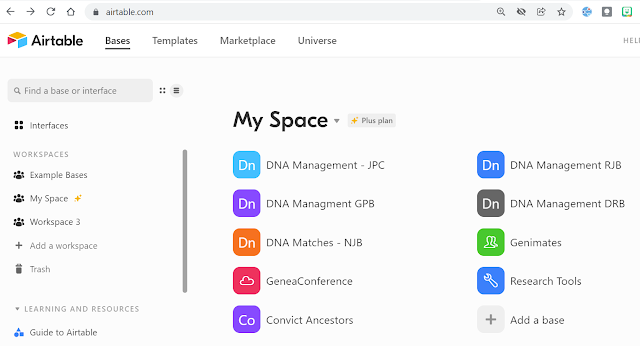
The Bases in my Airtable Workspace

In my DNA Management - JPC Base I track matches for the seven kits I manage that share my ancestors. Within this base I have four tables that are related to the primary table.


The Fields I have on JPC Matches are: Kit Name, Surname, Forename, Kit Manager, Line (4 grandparents), DNA Painted, GDAT, Test Site, Columns for each match, % of Aboriginalty, Relationship to me, Match line. this next image shows part of the setup.
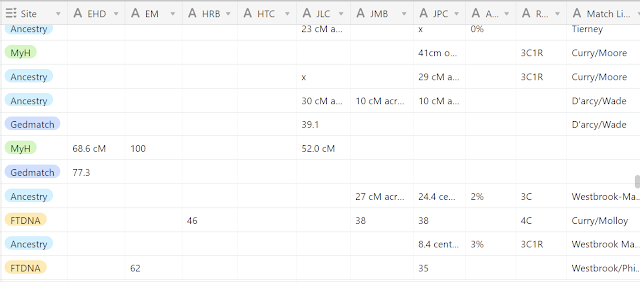

Further fields to the right of this image are match location, notes, and a link to the Match Details table.

You will note plenty of empty spaces as each cell is not pertinent to each tester. This is a work in progress where I add every match I find for those seven people. Each test one person does has a separate record.

I love that I can set up Multiple Select Fields for easy data entry which I use for Line, Testing Company, DNA Painted and GDAT.
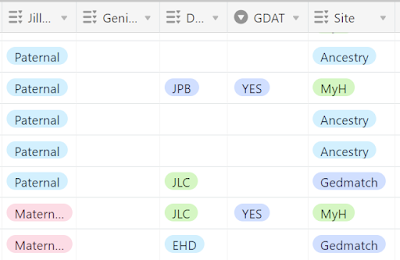
Multiple select fields save typing

The possibilities for use of this program are endless. setup is easy, data entry uncomplicated and there are so many means of sorting, sifting and analysing data. There are many templates available in the Airtable community that one can use and modify to a situation.

Another way I use Airtable is to keep track of my genimates. Over the years I have met so many folk in person and online. It's good to be able to quickly find their details when my poor old memory fails. 

My Genimates base has these tables.


Genimates has details of the people I have met, Terms manages my Geneadictionary entries (which links back to Genimates), Blogs has details of various blogs (links to Genimates and Societies), Websites has details of various websites (links to Genimates and Societies), Societies/Hosts (links to Blogs, Websites and Presentations) and Presentations manages my gigs and links back to Societies/Hosts.

After playing around with Airtable for a couple of months I took out a subscription because some of my bases grew to be too large (more than 1200 records) to be covered by a free account. I also wanted the flexibility to create more bases than allowed in a free account. I have read of other genies (watch the two videos from Rootstech) who use a free Airtable account successfully for their projects.

I plan on using GDAT for chromosome analysis. The GDAT website says "Genealogical DNA Analysis Tool (GDAT) is an app that utilizes autosomal DNA to aid in the research of family trees. The app houses a database of the autosomal data downloaded from various testing companies and provides analysis tools for family history research." 

While it's a challenge for this old girl I understand that GDAT is the gold standard for chromosome analysis. I have managed to download my matches from several other sites to GDAT and am slowly getting to know the product. I would love to have someone to hold my hand on this journey. 

Monday, January 7, 2019

The ironing's not done ....

.... and it's all Shelley Crawford's fault.

Since she wrote about her network graphs for Visualising Ancestry Matches last year last year I have been hooked. Shelley posted detailed  instructions for creating these very useful visual representations of one's Ancestry matches (and beyond 4th cousin level too). What was easy for a cluey chick like Shelley was hard labour for this old girl. I persevered and created my first graph which helped me work out a few connections.

Since I created my first masterpiece my number of Ancestry matches has grown greatly. In October before I went on holidays I started the process again but it took me ages and my resulting graph looked like a dog's breakfast.

Shelley must have realised that there were quite a few people like me who didn't really have the patience and persistence to create these useful things because in December she announced her ConnectedDNA service. For a small fee one can avoid the headaches associated with creating network graphs by contracting Shelley to do the dirty work for you.

I placed my order and coughed up my $80 on Saturday. I was sent a link to upload some files to Dropbox for Shelley to work on. When I opened my email Sunday morning my files were waiting for me.   I received four files : the most amazing spreadsheet that listed all my matches with lots of relevant data, my very pretty network graph in two formats (.pdf and .jpg) and  a group map that gives an overview of my pretty graphs.

My pretty graph looks something like this but it also has names on each of the dots
The pretty graphs show clusters of relationships of my matches so I can see at a glance who matches with whom and therefore deduce where in my tree a relationship may be (very handy for those matches who are treeless and have meaningless kit names).

I love the spreadsheet and have gone down a rabbit hole today adding the notes from my own basic sheet of matches into Shelley's.  I have already been able to work out where a few more matches fit into my tree. I'm so impressed that I want to order graphs for all of the kits I match on Ancestry and FTDNA but I had better work with what I have and save up some pennies for more graphs from ConnectedDNA.

Perhaps I could even do some ironing.


Friday, January 16, 2015

Geneabloggers - Who and Where are you?

I love a spreadsheet. I use Excel and Google sheets for all manner of geneatasks. On one of my Google sheets I keep a record of the blogs I have included in my GeniAus' Gems or GAGs posts. I have columns for Date, Blogger Name, Blog Title, Post URL, Country and Blog type.

You wouldn't believe the trouble I sometimes have finding information to record in the name and country fields. I realise that some geneabloggers are shy and concerned about security but you can  afford to give a little information away about yourself.

You don't have to go overboard. On your About Me page or Widget you can simply call yourself Sue from Sydney, Wilma from Wyoming or John from Jersey. This small amount of information will give readers some context when they read your post and should not put you at risk of a major cyber attack. If you are a risk taker you might even add a little more biographical information that does not lead a robber to your door.  Alternatively you can tell a little about yourself in the subtitle of your blog, I describe myself there as "an amateur Australian genealogist who enjoys collaborating via sociall media".

Printed books usually display the author's name and give a bit of biographical information. Let's make sure we do this for our blogs.

Today I looked at the About Me page of a "Professional Genealogist" in which she wrote glowingly of her skills. I had to do some major sleuthing to find out what country she was situated in, from the bias in her blog posts I guess it must be the US. Also amazing was that she did not mention about her areas of expertise. Duh!

Another About Me was from a a genealogy author who is a nameless blogger. Her About Me page had links to her books on Amazon so I had to go there to find her identity. Duh!

This little spreadsheet exercise sent me running back to my blogs to make sure that I was easily identifiable. On this blog I have an About Me widget that directs the reader to my Google+ profile and a Contact page that has my name. Phew!

Have you checked your About Me information recently?


Tuesday, August 19, 2014

Spreadsheets

In recent weeks there has been a lot of discussion around spreadsheets with DearMyrtle hosting a couple of Hangouts on the subject and other bloggers writing posts.

I am a bit of a spreadsheetaholic and use either Excel or a Google Sheets every day to organise my personal life and for some genealogy applications. I was however surprised when I saw some people using spreadsheets for things that my genealogy program does.

One of the main views on Family Historian, the genealogy software database I use,  looks just like a spreadsheet with data displayed in colums each one of which one can sort. One is able to add or remove columns from this display to suit one's needs, any field in the database can be added as a column.

At present these are the colums I have in my display:
Name, Record ID, Sex, Living, Dates, Birth Place, Death Date, Burial Place, Relationship to Root (me), Updated.


If I want to see who is buried in a particular cemetery prior to a geneajourney I just sort by that column by clicking on the column header. To see those entries I haven't updated for a while I can sort on the Updated column. Sorting by the Relationship to Root Column allows me to cluster all my closest relatives together.

 I often add or delete columns when I am after particular information. If I wanted to find all the School teachers or Plumbers in my list I could add an occupation column and osrt on that, If I wanted to find all the Methodists I could add the Religion column and sort by that.

This display is also very useful for identifying where gaps appear in one's data, white spaces (and I have lots of them) indicate that work needs to be done.

So because of this feature in Family Historian I don't need to use external spreadsheets as much as I would if I was using another software package.

LinkWithin

Related Posts Plugin for WordPress, Blogger...